

Hours
 Monday 12:00-7:00
Tuesday 10:00-4:00
Wednesday 10:00-4:00.
Thursday 10:00-4:00.
Friday 10:00-4:00
Crafters – Wed. 10:30am
Story Time – Fridays 10:30am
.
See the Circulation and Borrowing Policy for membership information.
.
Is the barcode on your library card fading? We have discovered that the barcodes printed with a thermal printer tend to fade after a while. Reciprocal borrowing libraries will not be happy if they cannot scan your barcode. If you have found this to be a problem, please return your card to the library. A new barcode printed on a laser printer will be affixed to your card. Sorry for the inconvenience.
.
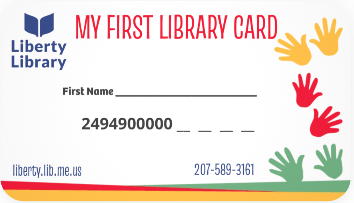 NEW! Children who join the library should receive a library card. We now have a First Library Card! Any child under 12 who is already a member of the library may ask for one at the library Desk.
.
Note: These cards may not be used for Reciprocal Borrowing. But if you want a Reciprocal Library card, ask at the Desk.